01
Local by design
The Electron app runs from source on your computer and connects directly to the supported exchange APIs.
Arrow Agent is the local assistant inside Synapse Labs Trading Bot Desktop. It helps you understand the current monitor state and control the workflow through a focused chat—while your exchange credentials stay in the desktop app.


Arrow works inside a secure local sandbox, isolated from your credentials and trading controls. It only receives the non-secret Synapse state needed to assist you.
Built for the desktop workflow
The app keeps exchange data, monitor controls, and Arrow Agent in one local workspace instead of sending you to a separate chat product.
The Electron app runs from source on your computer and connects directly to the supported exchange APIs.
The monitor reads account and position data. The current desktop app does not create orders or require trading permissions.
Arrow Agent uses the local Hermes Agent bridge for guided chat and requires confirmation before applying supported controls.
Desktop preview
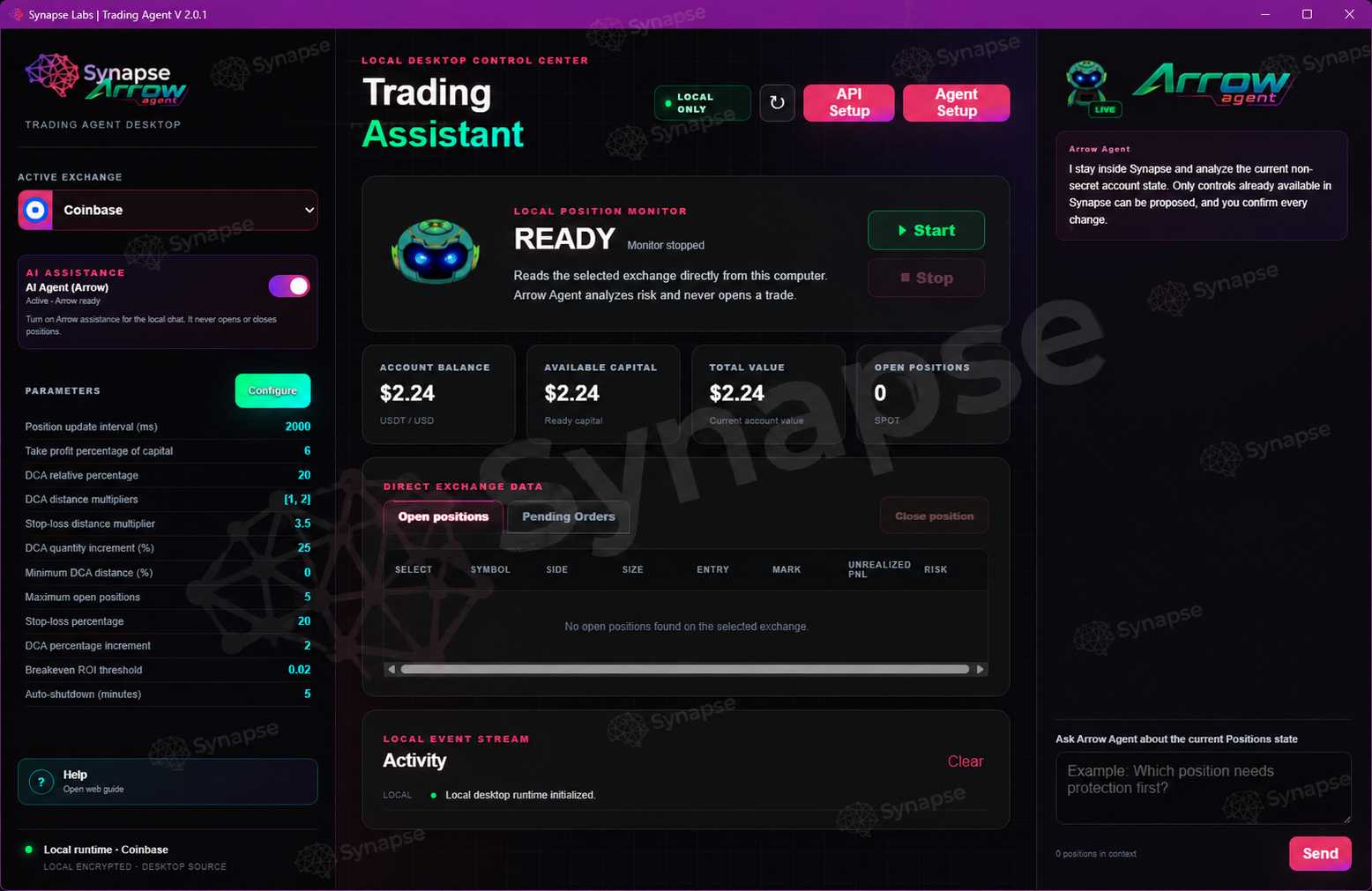
A local control center that combines exchange data, monitor controls, configurable parameters, and an AI-guided assistant inside one focused Synapse workspace.
Runs on your computer and connects directly to supported exchange APIs instead of routing account data through a remote Synapse server.
Arrow Agent uses the local Hermes Agent bridge to interpret non-secret state and propose supported controls; every change requires your confirmation.
Balances and positions are monitored without trading permissions, while credentials remain protected inside the desktop app.
Exchange status, parameters, activity, and Arrow Agent stay together in a secure local Electron window.
Desktop app
The source app is now available in the public Synapse Labs GitHub repository. Clone it or download the repository ZIP to run the local Electron workspace.
# Public source app · MIT licensed · Local Electron workspace
npm install and start it with npm start.
Public repository
The public repository contains the Electron source, assets, tests, and setup instructions.